
Professional Photoshop services are significant in availing, redesigning, and modifying the images to suit the…
AI Cutouts vs. Manual Clipping Paths: Which Wins in 2026?
One-click background removal tools have transformed how online sellers prepare product photography, sparking a practical question for every studio and brand manager: AI cutouts vs. manual clipping paths—which method actually delivers better commercial results in 2026?
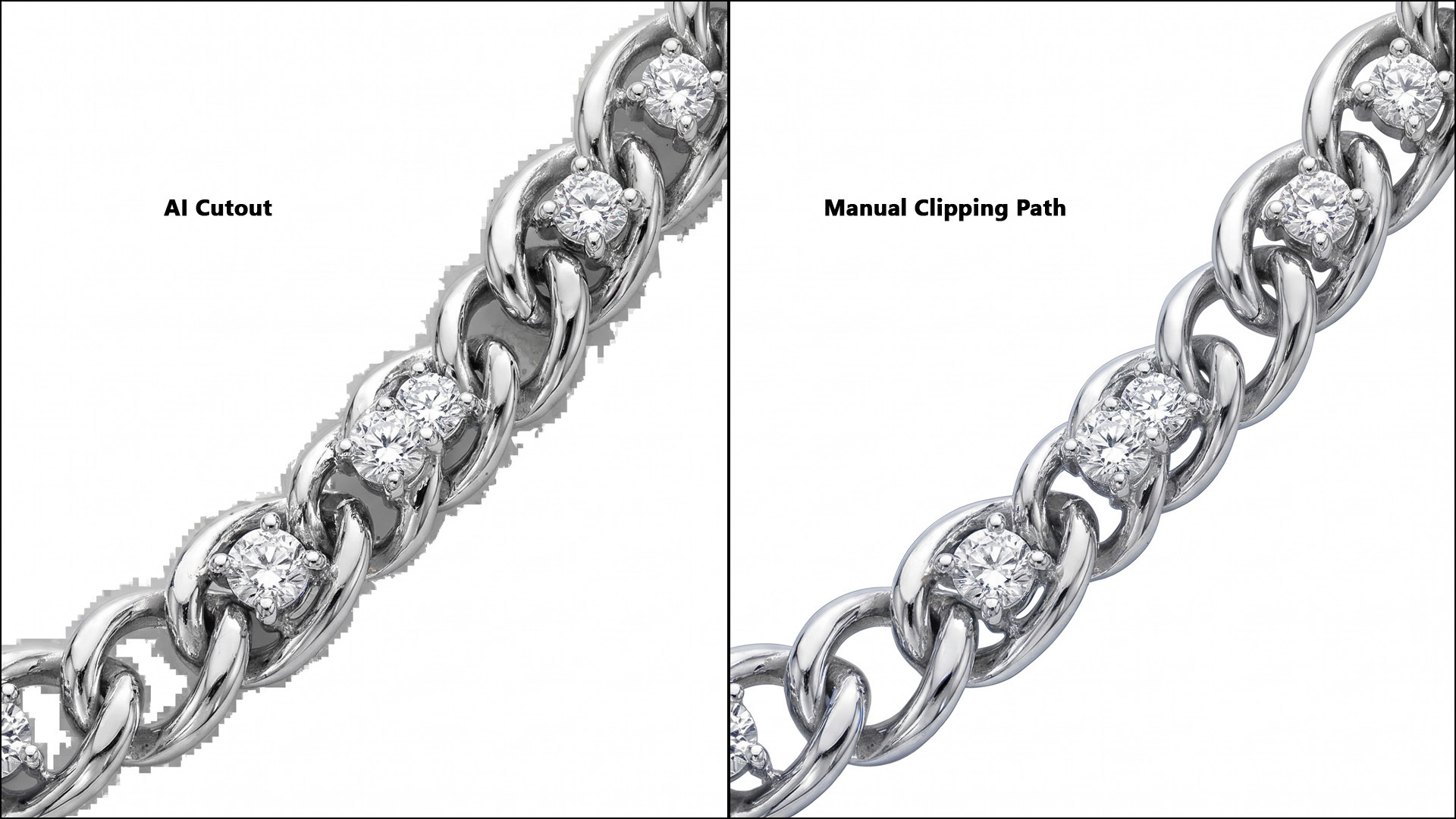
On paper, automated AI tools promise instant cutouts at a fraction of a cent. Yet thousands of Amazon, Shopify, and fashion brands still rely on hand-drawn manual clipping path services for their live storefronts. The reason becomes obvious the moment a shopper zooms in to 200%, or when an automated marketplace filter flags a listing for rough, semi-transparent edges.
Knowing where automated algorithms perform well—and where human Photoshop precision remains irreplaceable—will save your business from costly reshoots, suppressed listings, and lost conversions.
How Automated AI Cutouts Work
AI background removers use computer vision and machine learning segmentation models trained on millions of reference images. When you upload a photo, the software scans pixel contrast, brightness shifts, and recognizable object boundaries to estimate where the foreground product ends and the studio background begins.
Within two to five seconds, the tool generates a raster alpha mask that erases the surrounding backdrop.
Where AI Background Removal Performs Well
- Simple, High-Contrast Shapes: Solid boxes, hardcover books, smartphones, and matte bottles photographed against a clean, contrasting background.
- Internal Drafts & Mockups: Quick layout previews for pitch decks, mood boards, or internal design reviews.
- Fast Social Media Graphics: Casual promotional posts where viewers scroll past in a split second without zooming in on edge detail.
How Manual Clipping Paths Work
A manual clipping path is a closed vector outline drawn entirely by hand around a product using the Adobe Photoshop Pen Tool. Instead of guessing which pixels belong to the item based on color contrast, a trained retoucher places anchor points and smooth Bézier curves along the exact physical contour of the subject.
Because a clipping path is stored as mathematical vector data inside the image file (PSD, TIFF, or JPEG), it scales cleanly at any resolution and gives commercial printers, graphic designers, and e-commerce teams total control over edge sharpness, feathering, and background replacement.
Where Hand-Drawn Clipping Paths Are Essential
- Strict Marketplace Listings: Meeting Amazon’s pure white background (
RGB 255, 255, 255) guidelines without leftover gray halos. - High-Resolution Zoom & Print Catalogs: Large-format retail banners, magazine spreads, and e-commerce product pages where buyers inspect craftsmanship at 100%+ zoom.
- Complex & Multi-Hole Products: Bicycles, patio furniture, jewelry chains, woven baskets, and intricate machinery where dozens of interior background pockets must be knocked out cleanly.
AI Cutouts vs. Manual Clipping Paths: Head-to-Head Comparison
| Evaluation Factor | Automated AI Cutouts | Manual Clipping Path Service |
| Edge Precision | Pixel-based raster mask; prone to jagged stair-stepping or soft halos | Smooth, razor-sharp Bézier vector curves drawn by hand |
| Complex Shapes & Holes | Often misses interior gaps (chains, spokes, chair rungs) | Every interior cutout path is traced individually |
| Low-Contrast Edges | Struggles when a white or silver item sits on a light studio backdrop | Human eyes distinguish subtle tonal seams accurately |
| Transparency & Glass | Frequently erases translucent glass or leaves cloudy residue | Preserves realistic glass refraction and clean edge boundaries |
| Turnaround Speed | Instant (2–10 seconds per image) | Structured 12–24 hour delivery (3–6 hours for rush batches) |
| Quality Assurance | Zero human inspection unless you review every file yourself | Multi-step QA review checking edge smoothness and HEX purity |
| True Cost at Scale | Low upfront subscription, but hidden labor cost fixing failed files | Predictable per-image pricing with guaranteed ready-to-publish quality |
6 Product Categories Where AI Cutouts Consistently Fail
Even the newest 2026 AI segmentation models hit predictable technical walls when handling commercial studio photography. If you sell any of the following six product types, automated cutouts create more cleanup work than they save:
1. Fine Jewelry & Reflective Metals
Gold chains, prong-set diamonds, and polished watches reflect the surrounding studio room. AI algorithms frequently confuse bright silver reflections with the white studio backdrop—slicing right through thin bands or leaving dark background patches trapped inside chain links.
2. Apparel, Lace & Ghost Mannequin Garments
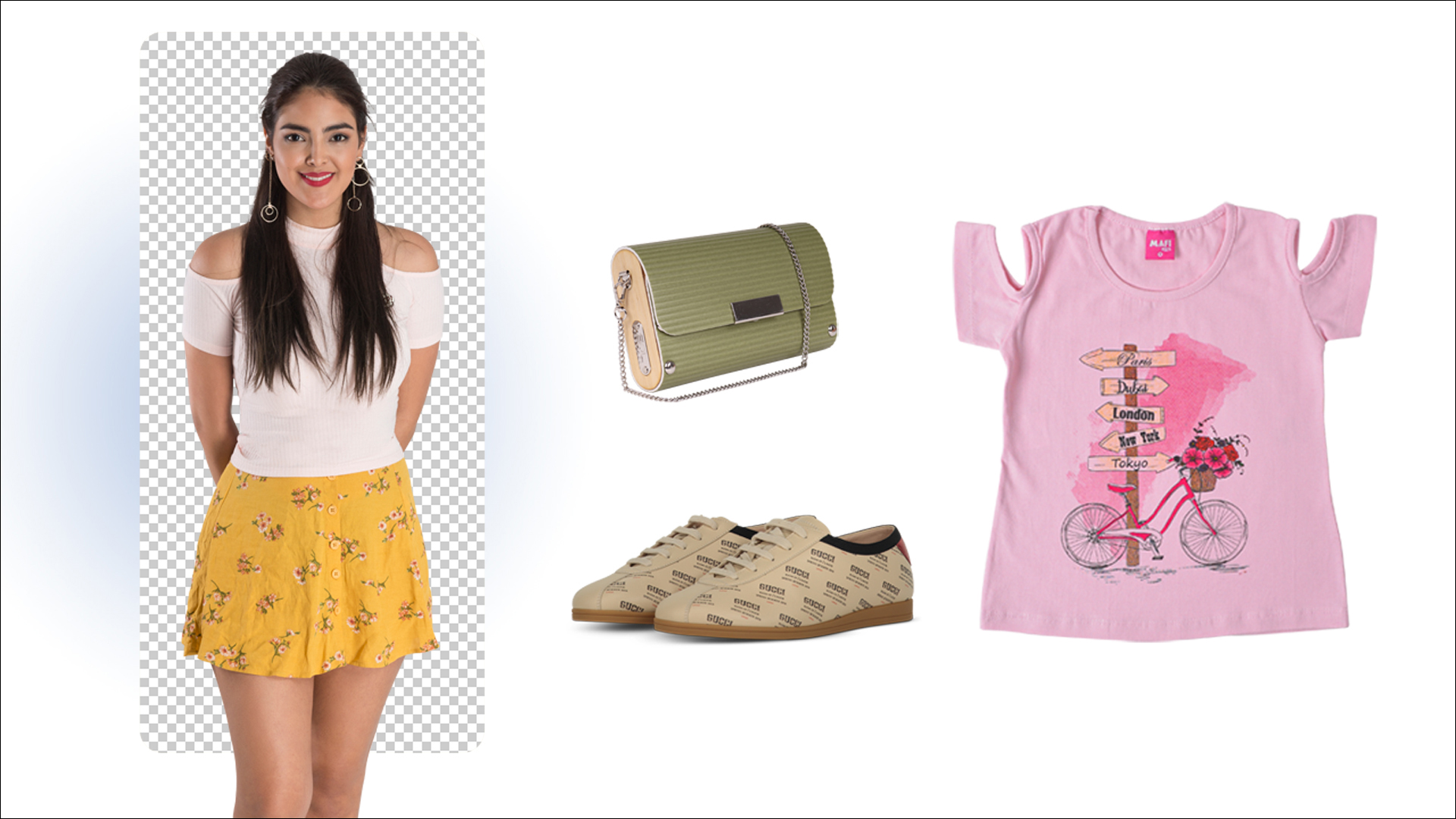
Clothing edges involve delicate stitching, semi-sheer mesh, buttons, and frayed denim hems. Furthermore, when producing ghost mannequin editing for fashion catalogs, an algorithm can not reconstruct missing interior collar labels or paint natural neck-joint shadows between front and back exposures.
3. Glassware, Cosmetics & Translucent Packaging
Perfume bottles, wine glasses, and frosted skincare jars allow background tones to pass through the product. Automated tools either punch solid holes through the bottle or leave an unnatural gray tint trapped inside the glass.
4. Low-Contrast “White-on-White” Products
Shooting white sneakers, ceramic tableware, or bridal gowns against a light gray cyclorama wall is standard studio practice—and a common failure point for AI edge detection. Without strong tonal contrast, algorithms routinely chew into the outer edges of the product.
5. Furniture, Bicycles & Wire Structures
Products with dozens of negative-space openings—such as spoked wheels, rattan chairs, or industrial shelving—require individual sub-paths. AI tools commonly leave solid blocks of the original studio wall inside small interior openings.
6. Hair, Fur & Soft Plush Textures
Standard vector paths alone are not designed for wispy flyaway hair or faux-fur coat trim; those require advanced alpha-channel and layer masking. AI cutouts tend to clump fine hair strands into a rigid, helmet-like outline.
The Hidden Cost of “Cheap” AI Editing
Many e-commerce managers adopt an automated background remover to save $0.50 per image, only to uncover a hidden operational bottleneck: manual quality inspection and repair.
Consider what happens during a 500-SKU seasonal catalog upload:
- You run 500 photos through an AI batch tool in ten minutes.
- Roughly 20% to 35% of those files come back with clipped straps, fuzzy edges, or missed interior holes.
- Your in-house designer or store manager must open all 500 files, locate the defective ones, and manually rebuild the broken masks in Photoshop anyway.
By the time you factor in internal staff hours and delayed product launch dates, fixing botched AI cutouts often costs more than sending the raw batch directly to a dedicated post-production team.
The Hybrid Workflow: How Top Studios Combine AI Speed with Human Craft
Choosing between automation and human retouchers does not have to be an all-or-nothing decision. High-volume post-production studios now use a human-led hybrid workflow:
- Triage by Complexity: Simple, hard-edged items may start with an automated base selection, while complex jewelry, apparel, and reflective goods go straight to senior Pen Tool specialists.
- Manual Vector Path & Mask Refinement: Human retouchers zoom in to 200%–300% to trace every curve by hand, adjust path feathering (typically 0.3px to 0.5px for natural blending), and craft realistic drop or reflection shadows.
- Dedicated Quality Assurance (QA): A second senior editor audits every completed file against marketplace guidelines—verifying pure
#FFFFFFbackgrounds, consistent margin padding, and crisp zoom detail before delivery.
Frequently Asked Questions (FAQ)
Is a manual clipping path better than AI background removal for Amazon?
Yes. Amazon enforces strict technical standards on main product images, including pure white backgrounds (RGB 255, 255, 255) and clean product boundaries without leftover background artifacts. Manual clipping paths guarantee smooth, compliant edges that pass automated listing checks and stay crisp under Amazon’s zoom feature.
When is AI background removal good enough to use?
AI cutouts work well for simple, opaque objects with sharp borders (such as boxed electronics or books) when used for social media graphics, quick internal presentations, or low-resolution thumbnails where buyers will not zoom in on fine edge details.
What file formats support embedded clipping paths?
Photoshop PSD, TIFF, EPS, and high-resolution JPEG files can store embedded vector clipping paths. This allows graphic designers and print layouts to toggle backgrounds on or off non-destructively at any time.
How much do manual clipping path services cost per image?
Depending on edge complexity and batch volume, professional manual clipping paths typically range from $0.29 to $4 per image for standard e-commerce items, with custom quotes for intricate jewelry, bicycles, or multi-layered masking.
Get Pixel-Perfect Manual Clipping Paths with CutoutQuick
Do not let jagged AI edges or leftover background halos hurt your brand credibility. At CutoutQuick, our team of dedicated Photoshop Pen Tool specialists delivers 100% hand-drawn manual clipping path services, intricate hair and fur masking, natural shadow creation, and ghost mannequin editing for e-commerce brands and photography studios worldwide.
- Razor-Sharp Hand-Drawn Paths: Traced at 200%+ zoom for smooth curves and zero pixel halos.
- 12–24 Hour Standard Turnaround: Fast daily delivery with rush options for urgent campaign launches.
- Two-Tier Quality Control: Every image is inspected by a dedicated QA lead before it reaches your inbox.
Test our precision on your toughest product photo—completely free. Send 2 unedited images to CutoutQuick today and receive clean, marketplace-ready cutouts within 24 hours.

Related Posts

Comments (0)